- 1.What is course registration and what is its purpose?Use the registration form to select the courses you are interested in studying. If you meet the conditions set for the course (course prerequisites, course capacity, etc.), you will be enrolled/confirmed in the course. If you do not comply, the course will be marked red and you will not be enrolled. Course enrollment (confirmation) occurs during the enrollment and change of enrollment period (see the term calendar).
- 2.How can I register for a course?
Registration of courses can be done via
The Information system Student Start of term Course Registration and Enrolment Add coursesThere are several ways to register/enroll in courses:
- Course catalog – specific courses can be selected using the course code, name and other parameters.
- Registration template – allows you to choose suitable courses from your study's registration templates.
- Study planner – allows you to choose courses from a pre-created study plan.
- Unsuccessful courses – the possibility of choosing courses that you have not successfully completed and are listed in the given semester. According to the SZŘ, you must re-enroll in unsuccessful courses as soon as possible. If you do not add them with this option, the system will add them automatically at the beginning of the course registration period (applies to courses listed every semester). Courses that are not offered every semester are automatically registered before registration begins.
- Courses for everyone – a faculty offer directly addressed to students of other faculties and programmes (courses have no enrolment restrictions and do not require in-depth knowledge of the field).
- Courses enrolled in most often – the offer of courses most enrolled by students of the same programme.
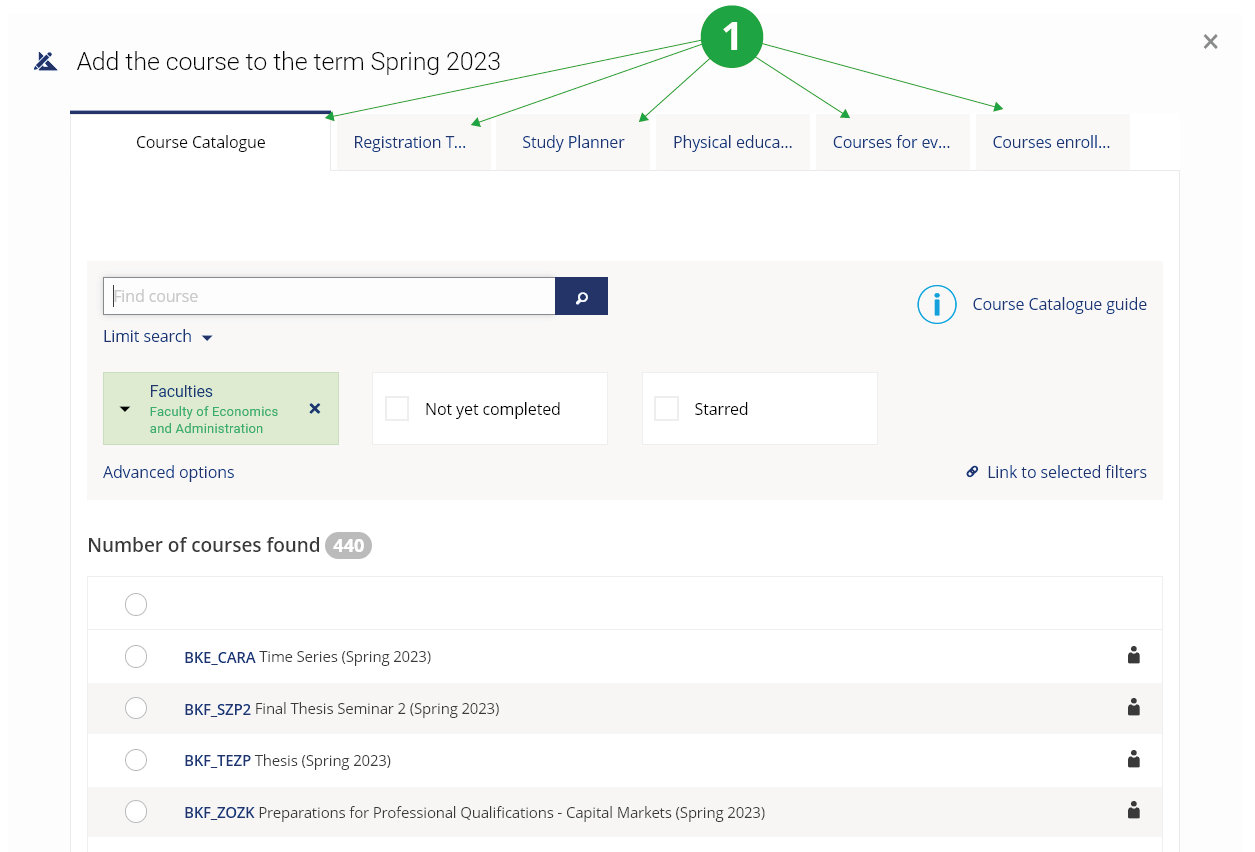
1 Registration options in the system.
After selecting the courses in Preparation for registration, the courses can be registered by clicking the "Try to register or enroll courses" button. If courses are added during the registration period, they are registered immediately upon addition. If courses are added during the enrollment period, they will be enrolled immediately.
- 3.How do I print my completed courses syllabi?Go to:The Information System Student End of Studies Grades and Credits Obtained During All My Studies and My Grade Average Syllabi of completed coursesCheck the courses whose syllabus you wish to print and select the order of the courses.
- 4.How do individual links work in the registration application?
The registration application is divided into the following areas:
- Preparation for registration – courses you will want to add during the registration/enrollment period.
- Registered courses – courses that you have successfully registered for. White registered courses are ready for enrollment.
- Enrolled courses – successfully enrolled courses.
The application also offers the following options:
- Logging into seminar groups
- Change the number of credits
- Change the way the course is completed
- Request an exception
- View the timetable
- 5.When and how can I cancel my registration for or enrollment in a course?Both registered and enrolled courses can be cancelled during the registration, enrollment and enrollment change periods. Individually, courses can be cancelled directly in the registered/enrolled courses overview table by clicking on the waste bin icon. The courses that are only registered can be cancelled at any time.
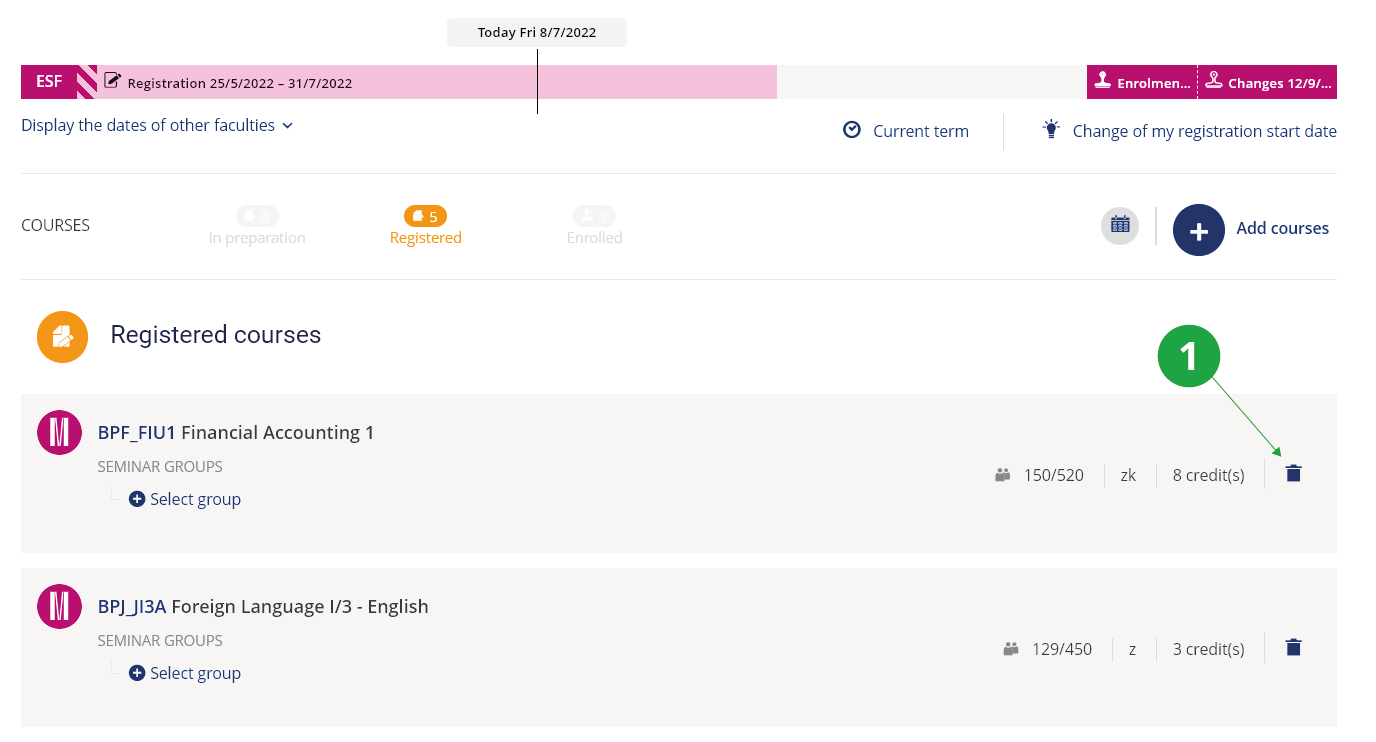
1 If there is currently a period when the course can be cancelled, a blue (active) trash can icon is displayed for the course.
- 6.What is the difference between registration, enrollment and changes in enrollment?
- Registration
- The registration period is used to express interest in studying courses or to obtain a better time stamp for capacity-limited courses.
- Enrollment
- During this period, automatic enrolment/confirmation occurs for courses for which the enrolment conditions (capacity, prerequisites, etc.) have been met. Only at the moment of enrolment do you acquire the right and obligation to study the course. Courses can continue to be registered or cancelled, seamless registrations are automatically enrolled each night.
- Changes in enrollment
- Courses may continue to be registered or cancelled during the period of final enrollment changes. Seamless registrations will be automatically enrolled each night.
- 7.Why does the registration system prioritize students repeating courses?According to , students are obliged to repeat unsuccessfully completed courses in the next semester when they are offered again. In order to enable repeating students to fulfil this obligation, the system tries to ensure good ranking and priority enrolment. For the specific manner in which failed courses are forced, see Prompting students to enroll in the courses they have failed to complete.
- 8.Prompting students to enroll in the courses they have failed to completeWhen it comes to prompting you to enroll in the courses you have failed to complete, the following rules apply:
- An unsuccesfully completed course that is not offered every semester is registered for before registration begins (this gives you the best ranking).
- An unsuccesfully completed course that is offered every semester is not forced on you before registration begins because grades have not yet been awarded (all students in the course appear to be repeating for failure). You will be automatically registered and enrolled before the start of the enrolment period (you will be ahead of regular students in the rankings). If you know you will be repeating a course, however, we recommend that you register for it as soon as possible.
- If you receive a grade by the end of the change in enrollment (the reason for repeating the course will pass) or if the Office for Studies approves your request not to repeat, the IS will automatically cancel the course from your enrollment.
- If a course is set to "it is possible to enrol in the course repeatedly" then it will not be automatically canceled from the course enrollment, even after a passing grade has been received for the past semester.
- A course will not be forced on you if a course with the same code is allowed to be not repeated at any later time after a failing grade.
- A forced course will automatically enroll the day before the start of the enrollment period even if it is registered in red.
- Interrupted studies – if you intend to register for a course, register for the courses separately and have your studies resumed as soon as possible by the office for studies due to the order in the capacity-limited courses.
- Study with an individual study plan – unsuccessful courses may be registered by the office for studies after enrollment changes period have passed.
- 9.How is my position determined, or why did it change?If the course is capacity limited, those students who have a satisfactory ranking will be automatically enrolled. The current rank is listed in the "Position" column. The system uses the following rules to determine the rank order:
- All those who have already enrolled in the course are ranked first (the Office for Studies may enrol the course regardless of the order). They have a ranking of 0. Their number can be found in the "Numbers".
- Students who have to repeat the course are ranked second. For most courses, these students are automatically registered by the system before registration begins (they are in good position), and for courses offered each semester, before the enrolment period begins. Their current number (i.e. those who do not yet have a passing grade) can be found in the "Repeating" section. The number of repeaters includes students who have registered for a course with a bad time stamp; this grade will automatically improve during the night.
- In addition, priority is given to students who are actively studying one of the "the fields the course is directly associated with". You can find out if you have priority in the "Preference" section. To find out how many applicants do and do not have priority, see the "Numbers" section.
- Last in the list are those students who are not studying the fields the course is directly associated with and are not repeating the course.
- If the fields the course is directly associated with in the catalogue change, a different number of students will be given priority.
- Repeat students will appear in the ranking (before the enrollment period begins) and will be automatically registered by the system.
- Students with previously interrupted studies who were able to register but whose ranking has not yet entered the calculation will be registered.
- The office for studies will enrol a certain number of students outside the normal registration.
- A reduction in rank may occur if someone placed ahead of you unregisters because they no longer need to repeat the course or finished (interrupts) their studies. This change can also occur if a student ahead of you had the course recognized (students with a recognized course are not counted towards the course capacity).
- 10.What are prerequisites and how are they evaluated?
Pre-requisites represent the requirements which the student must meet to be allowed to enroll in a course.
Label Meaning: it is necessary to have P10 completed P10 (enter the course code) P10 || P11 completed P10 or P11 (one course out of several options separated by ||) P10 && P11 completed P10 and P11 !P10 not completed P10 (!P10) && (!P11) completed neither P10 nor P11 NOW(P10) simultaneously registered for or enrolled in P10. For the required course (P10), it is further checked whether the major/field matches or if there is a 'consent' prerequisite. Other prerequisites of course P10 are not checked. NOW_LIMIT(P10) simultaneously registered without problems (within the capacity limit, meeting any other prerequisites) or simultaneously enrolled !NOWANY(P10,P11,P12) simultaneously neither registered for nor enrolled in any of P10, P11, P12 program(M-TV) student must be a student of the given study programme smer(BIVT) student must be a student of the given specialisation obor(HOT) student must be a student of the given field of study/study plan forma(P) student must be a student of the given mode of study typ_studia(BM) student must be a student of the given type of study (B, M, N, D, C, R) semestr(2) student must be enrolled in the given semester rocnik(1) student must be enrolled in the given year of study studijni_skupina(N) student must be a member of the given study group; a space in the study group name can be written with an underscore: studijni_skupina(Group_A) souhlas explicit (marked in IS VŠTE) teacher's consent (it is first necessary to apply for the consent) kredity_min(125) at least 125 credits obtained maxatr(3, core) enrolled in at most the specified number of courses with the specified attribute vycet expresses how many of all required prerequisites have been met maxszz(SZZ_MDP, 2) enrollment permitted for students who have fewer than three grades from a final state examination subject with the code S_SZZ_PREDMETY szz_vyplneno enrollment permitted for students whose final thesis archive has been accepted szz_vyplneno_tema enrollment permitted for students who have enrolled in a topic with the 'szz_vyplneno_tema' prerequisite and simultaneously have their final thesis archive accepted (if the student has not yet enrolled in any topic with the 'szz_vyplneno_tema' prerequisite, the archive's completeness is not checked) sem_sk(P10/S1) student must be enrolled in the given seminar group (S1) of course P10 max_prezencnich(50) the course may have at most the specified number of students enrolled in the full-time study programme max_kombinovanych(50) the course may have at most the specified number of students enrolled in the combined study programme Do not overlook the exclamation mark before the course code, which indicates that you must not have taken the course.
- 11.Where can I find out what courses I am expected to register for?The faculty determines the recommended or compulsory composition of studies in the study catalogue. To facilitate registration, templates for individual programmes have been prepared. Check the requirements set out for you in the study catalogue. For more detailed information about a given course, click on the course code. This information is filled in by the teacher (or guarantor) of the course, so the extent of the information may be different for each course. Similarly, not all sections may be filled in for each course.
You can find this information in the "Course information":- Extent and intensity
- It shows the weekly hourly allocation of the course through three fields for three possible types of teaching. The first field indicates the number of lectures, the second field exercises and the third field practical and other activities (laboratory, project, etc.).
- Teacher(s)
- Persons involved in teaching the course. For each person, the way in which he/she participates in teaching (lecturer, seminar tutor, assistant, etc.) is indicated.
- Guaranteed by
- Persons and departments responsible for the offer and teaching of the course. A contact person to contact for consultation on the course is also listed.
- Timetable
- Times at which the course is taught.
- Prerequisites
- Enrollment requirements and information about whether you meet them or not (see the link “Do I meet enrollment requirements?”).
- Course enrollment limitations
- Course enrollment limitations such as course capacity limit, restrictions imposed on certain fields of study, etc.
- Fields of study the course is directly associated with
- The fields the course has been primarily designed for and students of which are given enrollment preference.
- Course objectives
- These describe teaching outcomes, i.e. knowledge, skills, etc. which students should have after completing the course.
- Syllabus
- List of topics to be dealt with during the course.
- Literature
- List of books the students enrolled in the course are recommended to read.
- Teaching methods
- This section describes the methods used to achieve course objectives (e.g. theoretical part, laboratory practice, etc.).
- Assessment methods
- A section for teacher requirements (attendance, course work, final examination requirements).
- Follow-up courses
- It contains a suggestion of follow-up courses.
- Teacher's information
- Information e.g. about consultation hours, links to further information, websites, etc.
- Further comments
- Space for additional information on the course.
- Listed among pre-requisites of other courses
- List of courses in whose prerequisites the selected course is listed, including the evaluation of the prerequisites (link "Do I meet enrolment requirements?").
- Full information on the course
- Lists all the information on the course.
- Evaluation statistics
- An application providing evaluation statistics and success rates of the course in the previous term.
- Enrollment statistics
- This application displays the numbers of students registered for or enrolled in the selected courses (applies to the current term).
- List of seminar groups
- Seminar groups of the course in the current term.
- Course opinion poll results
- Results of the course opinion poll conducted for the previous term.
- Course Discussion Forum
- An overview of the course discussion forums in all terms when the course was offered.
- Permalink
- Permanent link to the page containing information on the course.
- 12.How do I find out when registration is taking place?Go to:The Information System Student Start of Term Course Registration and Enrolment
Here you will find a graphical representation of the registration period, enrollment and enrollment changes at your faculty. Click on a colored bar to view more detailed information, including information about delaying the start of course registration.
Dates for other faculties can be expanded by selecting "Display the dates of other faculties".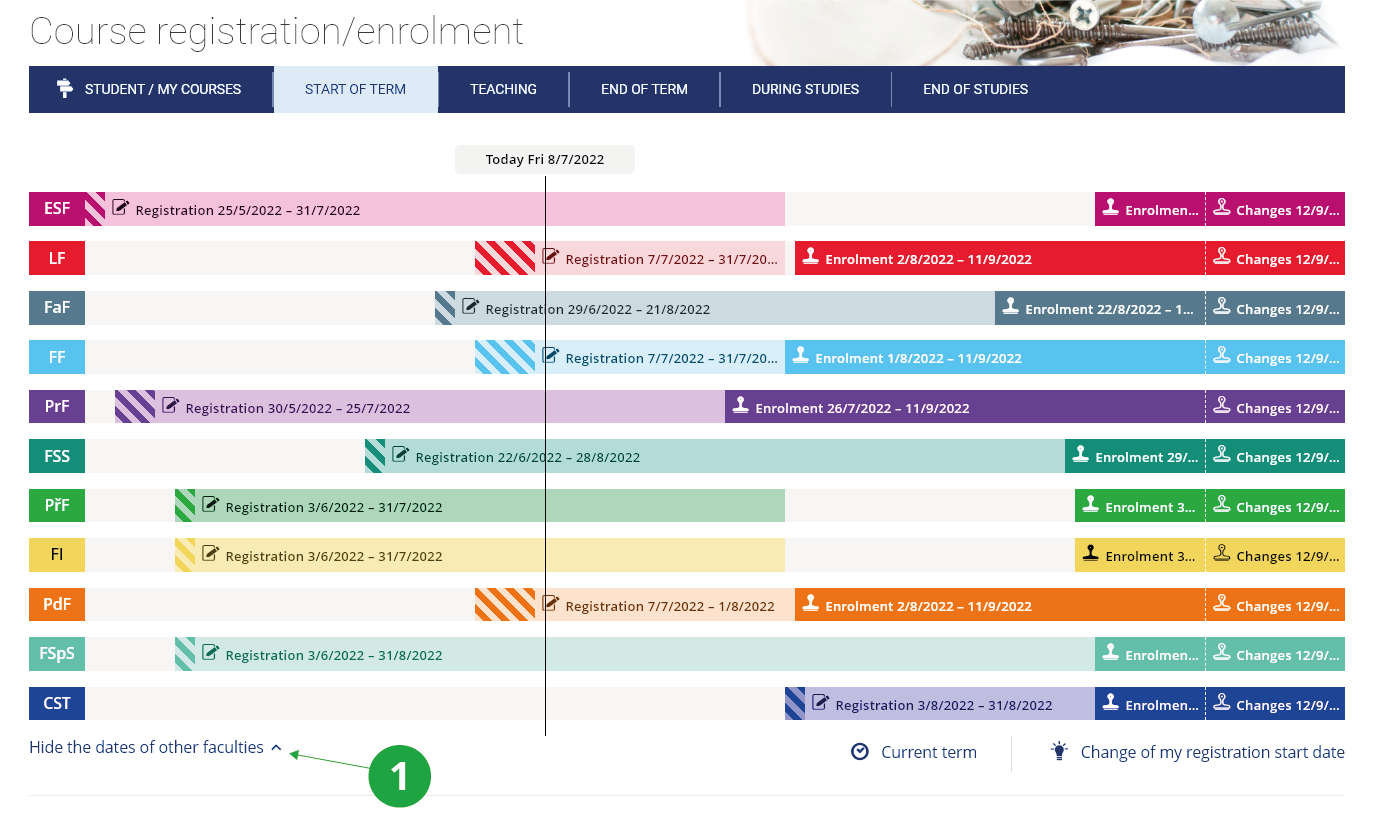
1 The student primarily sees the dates of his/her faculty, after clicking the switch he/she can see the dates of all faculties.
- 13.I cannot register/cancel my registration for coursesThere might be several reason why you cannot register for courses:
- Wrong term – semester
- It is necessary to have the correct term selected in the page header.
To change, click on the current term and select the term in which you want to register the courses.
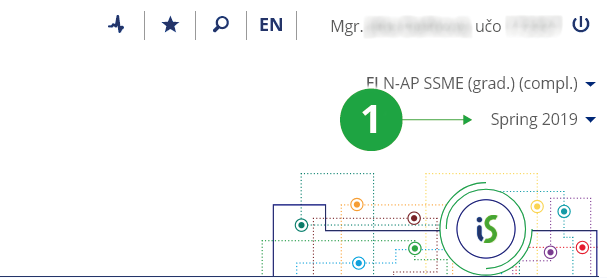
1 Changing the semester.
- A new programme of studies
- If your newly enrolled study is not displayed in the MU IS, have the data recalculated (the data is automatically recalculated at night) in the application
The Information System System System settings Verify the IS main page data now
- Registration start date
- You are not part of a registration wave that is already running or registration is not yet running at your faculty. The registration start date for you can be found in the colored bar in the header of the registration application.
- A course cannot be found
- Registration is running, but a particular course does not appear in the registration template. Search it and register it via the course catalogue. It is also possible that the course is not offered (not taught) in the current semester, then it cannot be registered.
- The period of enrollment changes is over, so no changes can be made any longer.
- It is a day preceding the start of enrollment period.
- 14.I failed to register for the courses during the registration period, what am I supposed to do now?Students will create their schedule at the time of registration for courses on the date specified in the Academic Year Calendar/Schedule.
- 15.Is there any way I can mark my favourite courses?Yes, you can star any course in the "Course Catalogue" by clicking on the course code to see detailed information. The star can be found next to the name of the course and by marking it you can add the course to your favourites. You can also mark courses in other applications, see Help for more details.

1 Use to star a course.
- 16.Where can I find the history of my registration and enrollment operations?Here you will find the name of the semester and the registered/cancelled course, the time stamp of the request and the identification of the person who made the request. Use the links:The Information System Student Start of Term My operations history
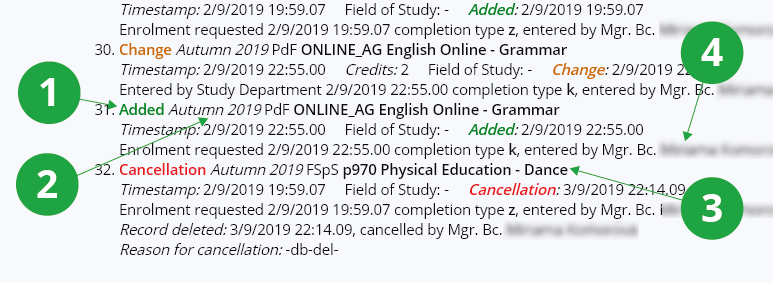
1 Operation performed.
2 Term.
3 Name of course.
4 Person who has performed the operation.
- 17.I have interrupted my studies. Shall I register for courses?If you plan to re-enroll in your studies in the upcoming semester, register for courses. Your registration requirements will not be included in the calculation of course registration order. If you re-enroll in your studies at a later date, the correct rank will be calculated after the fact (the time stamps from when the course was registered will be applied). If ranking is important to you (for capacity-constrained courses), it is advisable to re-enroll in your studies early, before course registration opens. Otherwise, you may be overtaken in the queue (course registration) by students with active studies.
Provided you have failed to find the information you were searching for, you can contact us at  fi
fi municz