Filling in additional course information
- 1.Where can a user fill in additional course information?
Courses in the Course Catalogue are described by two groups of data. Basic information (such as name, number of credits, ...) can be filled in by authorized persons with the katal_a or katal_b rights and is done in the "Course Editing" application (for more details, see the Help section Filling in basic course information).
Additional information (learning outcomes, course objectives, ...) is filled in by the course teachers. They can find the editor in
Information System Courses Course / Application Operations Edit syllabus and additional information providedTeachers can search for the course they need to edit. They can also easily limit the displayed courses to those where they are listed as a teacher or seminar leader (the "I am a teacher of" option) or course guarantors (the "I am a guarantor of" option).
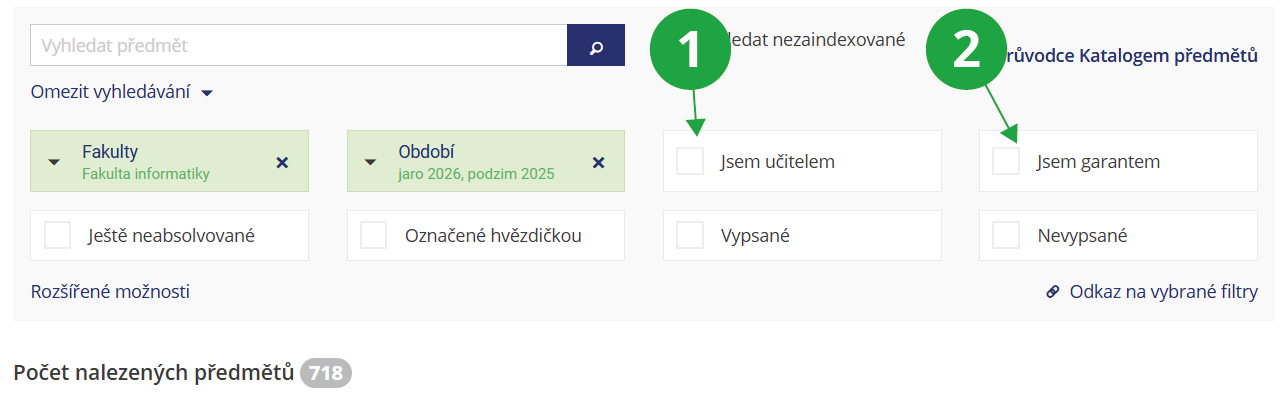
1 A teacher can filter for only those courses they teach.
2 A teacher can filter for only those courses where they are listed as the course guarantor.
The application can also be accessed via a shortcut from the main page:
Information System Syllabi [course selection] Go to application
1 The application for filling in additional course information can be accessed directly from the main page of the Information System.
Unless you have a special access right (e.g., katal_a, katal_b, katal_c), you can edit courses where you are listed as a "lecturer", "seminar tutor", or guarantor (this information is set in the basic information application).
If you are entering a course similar to another one, you can pre-fill the form with data from the other course and make adjustments.
- 2.Which sections do teachers fill in for course syllabi?
Teachers (persons listed as "lecturers" or "seminar tutors" in the course) and course guarantors fill in additional course information in the application:
Information System Syllabi [course selection] Go to applicationThey fill in the following sections, with explanatory instructions available in the form to assist them:
- Course objectives
- Learning outcomes
- Syllabus
- Anticipated learning activities and teaching methods
- Teaching methods
- Study support
- Literature
- Course website and teacher's information
- Option to complete the course in an alternate form
- Follow-up Courses
- Enrolment prerequisites
All of these details can also be filled in in English.
- 3.How should I fill in the learning outcomes for the ECTS catalogue?
In this help section, you will find stylistic recommendations for formulating learning outcomes, which are filled in under the Learning outcomes/Learning outcomes of the course unit section for the purposes of the ECTS catalogue.
Learning outcomes represent specific (measurable) knowledge, skills, and abilities that a student should acquire during their studies (i.e., what a student knows or is able to do after successfully completing a field of study/course). In this sense, learning outcomes are inextricably linked to assessment, as they simultaneously describe how students can demonstrate that they have achieved the intended outcomes.
Learning outcomes should be formulated using so-called "action verbs". For formulating learning outcomes, Bloom's Taxonomy is used, which identifies a total of six categories of learning arranged hierarchically according to complexity. For each category, there is an indicative list of action verbs that should be used when formulating learning outcomes:
Knowledge and understanding:
- knowledge/remembering: terms and facts, their classification and categorization
- understanding/comprehension: demonstrative understanding of facts and ideas by organizing, comparing, translating, interpreting, explaining
Intellectual abilities:
- application: use of abstractions and generalizations (theories, laws, principles, rules, methods, techniques, procedures, general ideas in concrete situations)
- analysis: breaking down parts, relationships, and organizational principles; analysis of complex information (systems, processes) into elements and parts, determining their organization, relationships, and interaction
- synthesis: combining elements and their parts into a previously non-existent whole (a comprehensive message, plan, or set of operations necessary to create a work or its project; deriving a set of abstract relationships for the purpose of classification or explaining phenomena)
- evaluation: critical assessment of materials, documentation, methods, and techniques based on knowledge
Example of English action verbs (quoted from https://cs.wikipedia.org/wiki/Bloomova_taxonomie):knowledge comprehension application analysis synthesis evaluation define
describe
list
select
complete
name
order
identify
reproduce
citeexplain
calculate
express
identify
classify
discuss
rephrase
prove
measure
interpretinterpret
apply
utilize
demonstrate
practise
show
masterdistinguish
analyse
characterize
estimate
calculate
test
compare
assess
categorize
illustrate
check
questionsummarize
plan
propose
construct
formulate
assemble
combine
create
set up
organize
manage
preparejudge
evaluate
argue
oppose
compare
revise
justify
appreciateKnowledge Comprehension Application Analysis Synthesis Evaluation define
repeat
record
list
recall
name
relate
underlinetranslate
restate
discuss
describe
recognize
explain
express
identify
locate
report
review
tellinterpret
apply
employ
use
demonstrate
dramatize
practise
illustrate
operate
schedule
sketchdistinguish
analyse
differentiate
appraise
calculate
experiment
test
compare
contrast
criticize
diagram
inspect
debate
question
relate
solve
examine
categorizecompose
plan
propose
design
formulate
arrange
assemble
collect
construct
create
set up
organize
manage
preparejudge
appraise
evaluate
rate
compare
revise
assess
estimateFormulation of individual learning outcomes is then introduced with a phrase such as “Upon successful completion of the course/programme, the student is able to…” followed by specific knowledge, skills, or abilities preferably expressed using one of the action verbs from the given category.
Tips for formulating learning outcomes:
- Start the formulation with an action verb, followed by the object and context.
- Always use only one action verb per learning outcome.
- Avoid vague terms such as "to be familiar with", "to be aware of", or "to know".
- Avoid complicated, compound sentences.
- Learning outcomes must be observable and measurable. Ensure that the achievement of outcomes can be assessed.
- Excessive and unrealistic requirements are a common error; it is therefore necessary to critically assess whether the outcomes are achievable depending on time and resources.
- When formulating learning outcomes, always keep in mind how they will be assessed, i.e., how students can demonstrate that they have achieved the intended outcomes. If learning outcomes are too general, assessment can be inefficient. Conversely, if they are too narrowly focused, the list of outcomes will be unnecessarily long and detailed.
- Before finalizing, it is advisable to consult the resulting formulations of learning outcomes with colleagues or graduates to see if they appear clear and appropriate to them.
- When formulating learning outcomes for lower-year students, try to avoid overusing action verbs from the lower categories of Bloom's Taxonomy (cognitive domain), and instead motivate students with learning outcomes belonging to higher categories (application, analysis, synthesis, evaluation).
Note: Adapted from “Writing and Using Learning Outcomes: a Practical Guide”.
- 4.When is it possible to change additional course information?
A course syllabus (prerequisites, literature, teacher information...) can be edited if the term in which the course is offered has the "Syllabi can be edited" flag set. Even if this flag is not set, it is possible to edit the Link and information from teachers section, i.e., the Course website link and Information from teachers.
For courses where 300 days have passed since the start of teaching, no syllabus section can generally be edited, regardless of the "Syllabi can be edited" flag setting.
Editing is carried out in the "Edit syllabus and additional information provided" application. The application can be accessed, for example, via a shortcut from the main page:
Information System Syllabi [course selection] Go to application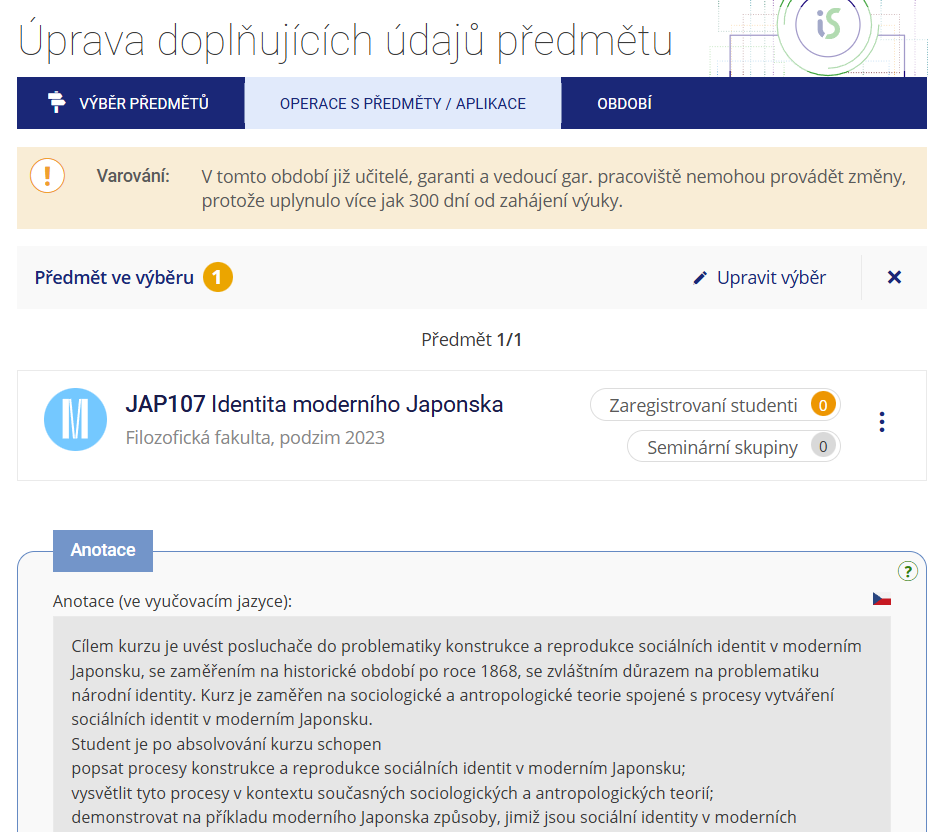
1 After 300 days have passed since the start of teaching, the editing fields in the application are greyed out and the data can no longer be edited.
- 5.Who can change additional course information?
The precise breakdown of access rights is as follows: each course is assigned to a specific department/unit (this is specified in the Department/Unit section in the form for basic course data, e.g., the course falls under the Department of Mathematics or Department XYZ). A person who holds the katal_a, katal_b, or katal_c right for that given unit can edit additional information for all courses under that unit. The right to edit additional information for a specific course is also granted to any person listed in the course record among the teachers as a "lecturer" or "seminar tutor", or as a course guarantor. Persons listed as "lecturers" and course guarantors can also add other teaching staff to the record (thereby granting them access to edit additional information).
Provided you have failed to find the information you were searching for, you can contact us at  fi
fi municz